Tools#
AI Assistance and MCP Server#
NB: This feature is experimental and may change in the future. Please give us feedback on your experience with it!
The MCP server provides documentation context only; it does not execute code.
If your AI coding agent supports the Model Context Protocol (MCP), you have two options:
- Use the hosted MCP server at
https://server.eufemia.dnb.no/mcp/web— no installation needed, always serves the latest released docs. - Run a local MCP server that exposes the packaged documentation from
/docs— useful for offline / air-gapped work, and pinned to the exact@dnb/eufemiaversion installed in your project (so the docs the AI sees match the components you actually consume).
Hosted MCP server#
Point your MCP-aware client at the public Streamable HTTP endpoint:
https://server.eufemia.dnb.no/mcp/web
It supports the modern Streamable HTTP transport, and serves the same documentation tools (docs_entry, docs_search, component_find, etc.) as the local server below. A health endpoint is available at https://server.eufemia.dnb.no/healthz.
It also provides portal_content_workflow, which gives an agent the complete
workflow for editing Portal content and delivering a focused pull request.
Version behavior#
The hosted endpoint is intentionally unversioned and always serves the latest
released Eufemia documentation. It does not require Eufemia to be installed.
Use docs_meta to identify the served version:
- When it matches the project's installed
@dnb/eufemiaversion, use the hosted tools normally. - When it differs, use the local MCP server from the installed package before relying on version-specific components, properties, or behavior.
- When the project has no Eufemia dependency, treat the hosted version as the proposed target and state it explicitly. Install that package version before claiming the implementation is executable or verified.
- When dependency installation is prohibited, the hosted server can still support documentation and planning, but skills must not claim runtime implementation or verification.
Offline use requires a preinstalled package or pre-provisioned documentation; neither the hosted server nor a transient skill download is available without network access.
Example: Claude CLI / raicode CLI#
claude mcp add --transport http eufemia https://server.eufemia.dnb.no/mcp/web# orraicode mcp add --transport http eufemia https://server.eufemia.dnb.no/mcp/web
Local MCP server (pinned to your installed Eufemia version)#
Run the local MCP server when you want the docs the AI sees to match the exact @dnb/eufemia version you have installed — for example to avoid suggestions that reference components or props from a newer release than your project consumes — or when the hosted server is unreachable (offline / air-gapped environments).
But first, make sure you have installed @dnb/eufemia and @modelcontextprotocol/server in your project:
npm install @dnb/eufemia @modelcontextprotocol/server# oryarn add @dnb/eufemia @modelcontextprotocol/server# orpnpm add @dnb/eufemia @modelcontextprotocol/server
Run the server from your project (where @dnb/eufemia is installed):
Example MCP config (e.g. .vscode/mcp.json):#
{"servers": {"eufemia": {"command": "node","args": ["${workspaceFolder}/node_modules/@dnb/eufemia/mcp/mcp-server.js"]}}}
Using Claude CLI with MCP:#
claude mcp add --transport stdio eufemia -- node node_modules/@dnb/eufemia/mcp/mcp-server.js
Using raicode CLI with MCP (using Claude):#
raicode mcp add --transport stdio eufemia -- node node_modules/@dnb/eufemia/mcp/mcp-server.js
How to use#
- The MCP server helps AI apply Eufemia patterns more accurately in code, but results can still be imperfect. So always review the output carefully!
- Ask your AI tool to search or summarize Eufemia docs, e.g. "Find the spacing system rules in Eufemia."
- If the server fails to start, confirm
@dnb/eufemiais installed and the path points tonode_modules/@dnb/eufemia/mcp/mcp-server.js.
Telemetry#
The local MCP server sends anonymous, aggregate usage statistics so we can see which tools, components and documentation areas are most used and improve the docs accordingly. It is on by default and opt-out.
What is collected is a closed, public vocabulary only: the tool name, the component name for a component lookup (e.g. Button, Field.Address), the leading documentation area for a doc read or list (e.g. /uilib/components/, gated against the areas actually present in the docs — a path outside the docs is dropped, not narrowed), and the @dnb/eufemia version you have installed. No machine identifier, user, session or correlation id, and no free text are in that payload — in particular a docs_search query is never collected (a search is recorded as a tool count only). The request's source IP is visible to the network layer like any HTTP call, but it is not part of this payload and is not stored on the ingest side.
Each event is a fire-and-forget beacon with a short timeout, so it never blocks or affects a tool call, and the server holds no credentials.
Turn it off by setting EUFEMIA_MCP_TELEMETRY to 0 in your MCP client config:
{"servers": {"eufemia": {"command": "node","args": ["${workspaceFolder}/node_modules/@dnb/eufemia/mcp/mcp-server.js"],"env": { "EUFEMIA_MCP_TELEMETRY": "0" }}}}
Agent Skills#
@dnb/eufemia includes official Agent Skills for
working with Eufemia:
eufemia-components— find components and verify current props, events, Forms, and layout APIs.eufemia-compose— compose pages and features from Eufemia primitives and guidance.eufemia-accessibility— apply Eufemia-specific accessibility guidance.eufemia-review— review code against supported APIs, deprecations, and documented rules.eufemia-migrate— plan and validate upgrades using current release documentation.eufemia-portal-content— help non-technical contributors edit portal content and create small pull requests with direct page previews.
The skills provide workflows and tell the agent which Eufemia documentation to retrieve. Component APIs, tokens, theme support, and other version-sensitive facts remain in Eufemia's packaged documentation and MCP server rather than being copied into the skills.
Why use skills with MCP?#
The MCP server can provide the same workflows as tools and current documentation. Skills complement it by helping an agent recognize relevant requests and choose the right Eufemia tools without the user naming them. They also make the workflows available in clients that do not support MCP. Keep skills focused on discovery and reusable workflow instructions, and retrieve version-sensitive facts from the MCP server.
Install project skills#
In a project that depends on @dnb/eufemia, use the CLI provided by the same
package:
yarn eufemia skills install
If the project does not depend on Eufemia yet, npm can download the package only
for the duration of the installer command without changing package.json or
creating project node_modules:
npm exec --yes --package @dnb/eufemia@latest -- eufemia skills install
This installs the project skill files, not the Eufemia runtime dependency. The
RAIWork marketplace plugin bundles the same skills and does not require
@dnb/eufemia to be installed just to discover them. If package downloads are
also prohibited, an administrator must pre-provision one of the supported skill
directories or the user must use an approved marketplace distribution.
The command asks where to install the six skills. Select one or more supported project locations:
- Claude Code and GitHub Copilot:
.claude/skills - GitHub Copilot:
.github/skills - Codex and GitHub Copilot:
.agents/skills
Use Space to toggle each location and Enter to install all selected locations.
Locations with a managed Eufemia installation are selected by default when the command runs again. Clearing a location skips its update; it does not uninstall the existing files.
Automation and CI#
Interactive users should use the selector. Scripts and environments without an interactive terminal cannot answer it, so automation must provide one project location explicitly:
yarn eufemia skills install --target .agents/skills
Equivalent commands with npm or pnpm are:
npm exec eufemia -- skills installpnpm exec eufemia skills install
Commit the installed skills when they should be available to colleagues and
cloud agents. The installer also writes .eufemia-skills-lock.json in every
selected skills directory. Commit each lock file together with the generated
skills so updates can detect local changes.
Update installed skills#
After upgrading @dnb/eufemia, update the installed project skills from the
same package version:
yarn eufemia skills update
The command opens the same selector with managed locations selected. It updates
the selected skills and their lock file, but refuses to overwrite locally
modified skill files. Review those changes first; use --force only when
replacing them intentionally. In automation, pass one location explicitly, for
example yarn eufemia skills update --target .agents/skills.
Run this command in the project rather than through the MCP server. The hosted HTTP server cannot access a caller's project files, and the package-local MCP server intentionally exposes the same documentation-only tools.
Manage installed skills#
# Show the skills included in the installed Eufemia packageyarn eufemia skills list# Verify installed files and package versionyarn eufemia skills check# Remove files managed by the Eufemia installeryarn eufemia skills uninstall
check uses .claude/skills unless you pass another installed location with
--target. Without --target, uninstall removes every managed supported
location in the project. It validates all selected locations before removing
any files. check reports missing, changed, stale, or version-mismatched files.
uninstall removes only files tracked by Eufemia skills locks and leaves
unrelated project skills untouched.
Evaluate skill changes#
Eufemia keeps representative output cases and trigger/non-trigger prompts in
packages/dnb-eufemia/agent-skills-evals. Before changed instructions are
released, run every case in a fresh session with the changed skill and a
baseline, grade the assertions, record token and duration differences, and
review the output manually. Positive routing cases must select the expected
skill, while unrelated and generic visual-exploration cases must not select an
Eufemia skill.
Follow the Agent Skills evaluation workflow and keep generated grading and benchmark workspaces with the release record, not in the published package.
The CLI is part of the main package and can also report its version:
yarn eufemia --versionyarn eufemia skills --help
Connect the documentation#
Install the Agent Skills and configure one of the MCP options above. Skills are the reusable workflow; MCP provides the current Eufemia facts. If MCP is not available, the skills should say that the relevant information could not be verified instead of guessing.
Build AI tools on Eufemia#
Treat Eufemia as the source of truth for shared design-system functionality and guidance when creating AI instructions, skills, plugins, MCP tools, or generated code.
Before adding local components, tokens, themes, patterns, or Eufemia guidance:
- Check the current, version-matched Eufemia documentation and supported APIs.
- Reuse or compose existing Eufemia capabilities where possible.
- If a generally useful capability is missing, consider contributing it to Eufemia so it becomes available to everyone.
- Keep product-specific business logic, integrations, and workflows in the product's own tooling.
- Avoid copying Eufemia documentation or API details into local AI instructions. Retrieve current information through Eufemia's documentation and MCP server.
Local solutions are appropriate for genuinely product-specific needs and temporary migration work. Keep the boundary explicit so local guidance is not mistaken for an Eufemia standard. See where a component change belongs for the general ownership guidance.
Code Editor Extensions#
The Visual Studio Code Extension#
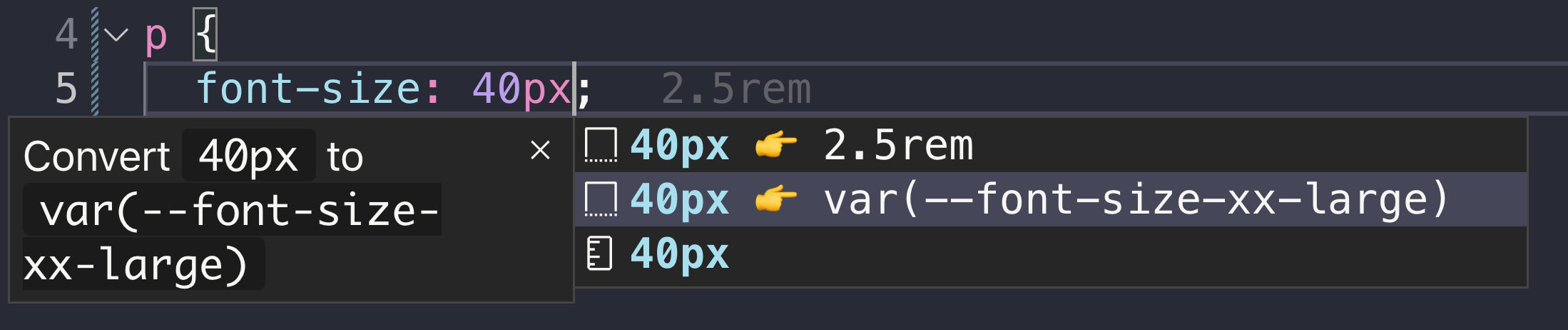
It supports:
- plain
pxtoremconversion. - annotation for
pxandremequivalent values. - auto completion for the spacing system.
- auto completion for
font-sizeandline-height.
Install the VSCode Extension or view the source code.
Screenshots#
- Spacing System example
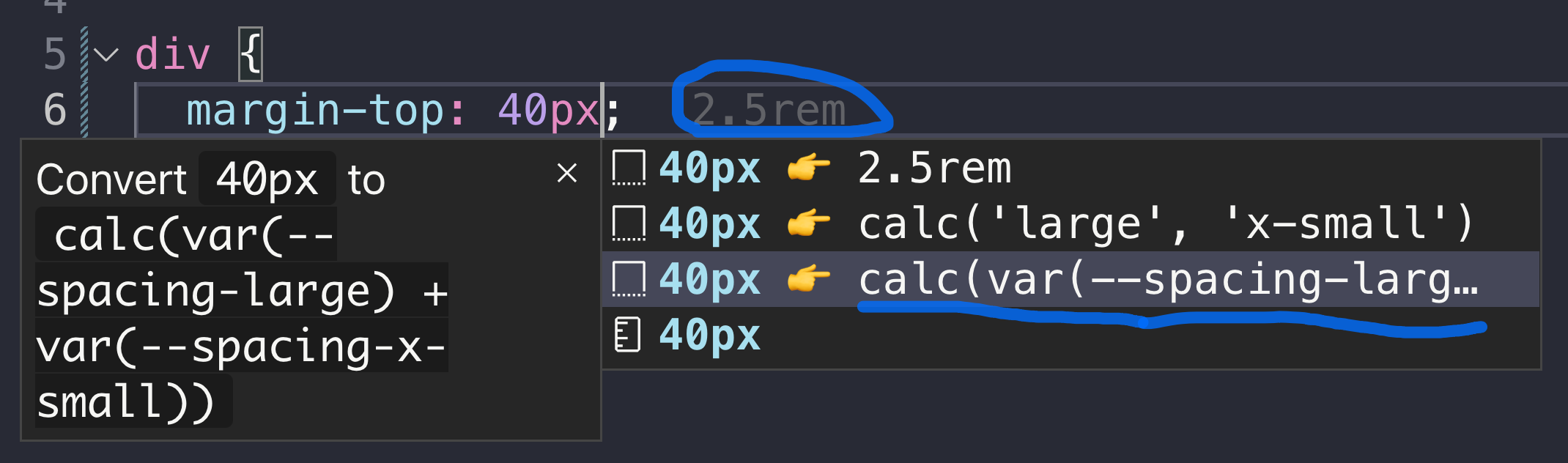
- Equivalent to
pxorremvalue example

font-sizeexample
Lint Plugins#
Eufemia ships lint plugins as part of @dnb/eufemia, so you can import them directly from the main package.
Install eslint and/or stylelint in your application if you do not already use them.
ESLint#
Use the recommended flat config preset:
import eufemiaEslint from '@dnb/eufemia/plugins/eslint.js'export default [eufemiaEslint.recommended]
If you need full control, register the plugin and configure the rules yourself:
import eufemiaEslint from '@dnb/eufemia/plugins/eslint.js'export default [{plugins: {eufemia: eufemiaEslint,},rules: {// All rules...eufemiaEslint.recommended.rules,// Or specific rules'eufemia/no-deprecated-color-variables': 'error',},},]
Stylelint#
Use the recommended preset to enable all rules:
import eufemiaStylelint from '@dnb/eufemia/plugins/stylelint.js'export default eufemiaStylelint.recommended
If you need full control, register individual plugins and configure the rules yourself:
import eufemiaStylelint from '@dnb/eufemia/plugins/stylelint.js'export default {plugins: [eufemiaStylelint],rules: {'eufemia/no-deprecated-color-variables': [true,{ severity: 'warning' },],'eufemia/token-name-policy': [true, { themePrefixes: { ui: 'dnb' } }],},}
Available rules:
eufemia/no-deprecated-color-variables— Warns when deprecated--color-*CSS variables are used. Suggests design tokens instead.eufemia/token-name-policy— Validates--token-*naming conventions: prefix, category, color semantics, theme prefixes, cross-brand parity, and more. Accepts athemePrefixesoption to map brand names to their CSS variable prefixes.
Review rule metadata#
Cross-tool review rules expose machine-readable metadata from the same source used by the lint plugins:
import reviewRules from '@dnb/eufemia/plugins/review-rules.js'const deprecatedColors =reviewRules['eufemia/no-deprecated-color-variables']
Each entry identifies its classification, default severity, documentation, supported tools, and whether an automatic fix exists. Projects may override lint severity, but should preserve the rule's documented meaning. A recommendation or context-dependent migration should not be presented as an unsupported API or an automatic fix.
MCP clients can call review_rules to retrieve the same catalog with the
stable rule IDs included in the response. The catalog currently covers the
cross-tool rules that have published metadata; tool-specific rules can still be
configured as documented above.
For SCSS files, configure Stylelint with postcss-scss as the custom syntax.
PostCSS (Style Isolation)#
If you use the style isolation PostCSS plugin, deprecation warnings for --color-* variables are enabled by default at build time:
import styleScopePlugin from '@dnb/eufemia/plugins/postcss-isolated-style-scope.js'export default {plugins: [styleScopePlugin()],}
To disable the warnings, set warnOnDeprecatedColorVariables: false:
export default {plugins: [styleScopePlugin({ warnOnDeprecatedColorVariables: false })],}
Both plugins ship with one rule: no-deprecated-color-variables. It reports deprecated --color-* CSS variables and guides towards design tokens instead.