Media Queries and Breakpoints#
To make media queries more declarative and easier to handle from JavaScript, you may be interested in using both the MediaQuery React component and the useMediaQuery React hook.
Media Queries Properties Table#
UX designers are using a 12 column system during their design processes.
| Pixel | Type | Rem | Custom Property | Comments |
|---|---|---|---|---|
| 640 | small | 40em | --layout-small | 4 columns |
| 960 | medium | 60em | --layout-medium | 6 columns |
| 1152 | large | 72em | --layout-large | 12 columns |
Breakpoint ranges#
Applications in DNB actually break only twice (small and medium), but have an HTML body max-width of large.
| React hook | Range | SCSS mixin | Columns |
|---|---|---|---|
isSmall | from 0 to 40em | allBelow(small) | 4 |
isMedium | from (not including) 40em to 60em | allBetween(small, medium) | 6 |
isLarge | from (not including) 60em | allAbove(medium) | 12 |
Note: if you've set custom SCSS breakpoints using $breakpoints or $breakpoint-offset, the SCSS mixins will be different.
So when dealing with the naming of breakpoint ranges (between breakpoints), we use the term "large" when a media query exceeds medium:
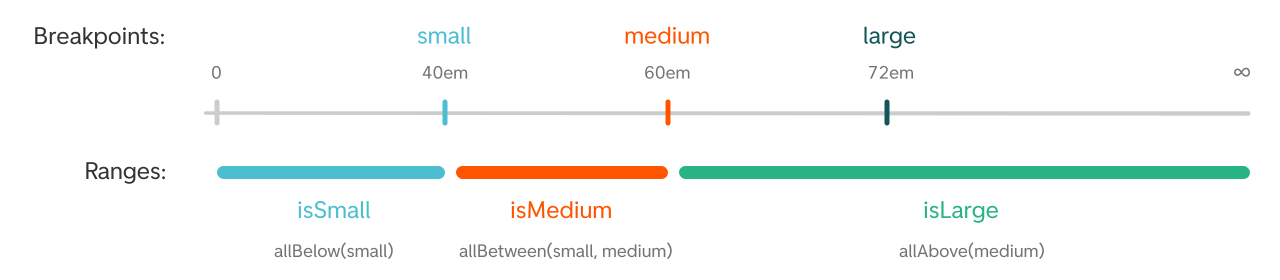
Here is how ranges breaks down in pixels:
- The small range goes from 0 to 640px
- The medium range goes from 640.1px to 960px
- The large range goes from 960.1px to infinity
UX Design and Breakpoints#
When dealing with breakpoints, UX often designs only for two sizes. This leads to an unknown size between breakpoints. Check with your UX designer how your application should behave when the screen size is in between.
MediaQuery component and React Hooks#
Both the component and the React Hooks uses the JavaScript API matchMedia.
-
useMedia React Hook for screen width only.
-
useMediaQuery React Hook for all kinds of media queries.
-
MediaQuery Component for all kinds of media queries.
Re-render and performance#
By using matchMedia, we only render when the requested media query actually changes. This means we don't need to listen to window.addEventListener('resize', ...), which is a performance waste, even with a debounce helper.
CSS similarity#
It uses the same query API as CSS. You can also provide your query raw by using, for example, query="(min-width: 60em)". However, custom queries can quickly grow and clutter your application code unnecessarily.
Properties#
You can both use min and max, they are equivalent to minWidth and maxWidth.
CamelCase properties will be converted to kebab-case.
SSR#
During SSR (Server Side Render), we don't have access to the client's window.matchMedia. To make the initial render result in a positive match, you can set the matchOnSSR={true} property.
Units#
Numeric values will be handled as an em unit.
useMedia hook usage#
The useMedia hook acts like a switch, where only one of the properties will be true at a time.
import { useMedia } from '@dnb/eufemia/shared'function Component() {const { isSmall, isMedium, isLarge, isSSR } = useMedia()return isSmall && <IsVisibleWhenSmall />}
The returned constants like isLarge etc. are within "breakpoint ranges" – likewise the SCSS mixins such as allAbove etc.
See the table above for the available breakpoints and their corresponding media queries.
SSR (Server Side Render) usage#
To lower the possibility of CLS (Cumulative Layout Shift) on larger screens, you can use the isSSR property. Try to use it in combination with isLarge because the negative CLS experience is most noticeable on larger screens:
import { useMedia } from '@dnb/eufemia/shared'function Component() {const { isSmall, isMedium, isLarge, isSSR } = useMedia()return (isLarge || isSSR) && <IsVisibleDuringSsrAndWhenLarge />}
During SSR, when no window object is available, all results are negative. But you can provide a initialValue:
import { useMedia } from '@dnb/eufemia/shared'function Component() {const { isSmall } = useMedia({initialValue: {isSmall: true,},})return isSmall && <IsVisibleDuringSSR />}
Here are all the options:
import { useMedia } from '@dnb/eufemia/shared'function Component() {const { isSmall } = useMedia({/*** Provide an initial value that is used during SSR as well.* Default: null*/initialValue?: Partial<UseMediaResult>/*** If set to true, no MediaQuery will be used.* Default: false*/disabled?: boolean/*** Provide a custom breakpoint* Default: defaultBreakpoints*/breakpoints?: MediaQueryBreakpoints/*** Provide a custom query* Default: defaultQueries*/queries?: Record<string, MediaQueryCondition>/*** For debugging*/log?: boolean})return isSmall}
You can disable the usage of window.matchMedia by providing useMedia({ disabled: true }).
You can log the media query by providing useMedia({ log: true }).
useMediaQuery hook usage#
This React Hook is a more extended version where you can define all sorts of media queries.
import { useMediaQuery } from '@dnb/eufemia/shared'// orimport useMediaQuery from '@dnb/eufemia/shared/useMediaQuery'function Component() {const match = useMediaQuery({matchOnSSR: true,when: { min: 'medium' },})return match ? 'true' : 'false'}
You can disable the usage of window.matchMedia by providing useMedia({ disabled: true }).
Live example#
This example uses the not property to reverse the behavior.
MediaQuery component#
import { MediaQuery } from '@dnb/eufemia/shared'// orimport MediaQuery from '@dnb/eufemia/shared/MediaQuery'
You have plenty of possibilities to mix and match:
<MediaQuery when={{ min: 'medium' }}>matches all above medium screens</MediaQuery><MediaQuery when={{ screen: true, orientation: 'landscape' }}>matches orientation landscape screens</MediaQuery><MediaQuery not when={{ min: 'large' }}>matches all, but beneath large screens</MediaQuery><MediaQuery matchOnSSR when={{ min: 'small', max: 'medium' }}>matches small and medium screens and during SSR</MediaQuery><MediaQuery when={[{ min: 'small', max: 'large' }, { print: true }]}>matches all between small and large screens or all print media</MediaQuery><MediaQuery when={{ max: '60em' }}>matches screens to a max of 60em</MediaQuery><MediaQuery query="(min-width: 40em) and (max-width: 72em)">matches screens between 40em and 72em</MediaQuery>
you can find the properties on this page.
Interceptor on change listener#
import { onMediaQueryChange } from '@dnb/eufemia/shared/MediaQuery'const remove = onMediaQueryChange({ min: 'medium' }, (match, event) => {// Callback})// Remove the listenersremove()
Use different breakpoints#
It is possible to change the used breakpoint types by providing them to the Eufemia Provider.
Both the MediaQuery component and the hooks useMedia and useMediaQuery will merge and use these custom breakpoints.
NB: This should only be done temporarily, because DNB should align on one set of breakpoints for the best UX and consistency.
import { Provider } from '@dnb/eufemia/shared'...<Providervalue={{breakpoints: {small: '40em',medium: '60em',large: '72em',},}}><App /></Provider>
Import breakpoints into JavaScript#
You get an object with the values and the types as the keys.
import { defaultBreakpoints } from '@dnb/eufemia/shared/MediaQueryUtils'
SCSS mixins#
You can reuse the SCSS mixins from Eufemia:
// breakpoints.scss@use '@dnb/eufemia/style/core/utilities' as utilities;$layout-small: map-get(utilities.$breakpoints, 'small');$layout-medium: map-get(utilities.$breakpoints, 'medium');$layout-large: map-get(utilities.$breakpoints, 'large');
or like this:
@use '@dnb/eufemia/style/core/utilities' as utilities;@include utilities.allBelow(large) {/* Your CSS */}@include utilities.allAbove(small) {/* Your CSS */}
Media Queries Examples#
@media screen and (max-width: 40em) {/* small */}@media screen and (max-width: 60em) {/* medium */}@media screen and (max-width: 72em) {/* large */}
Based on the findings of this article and this webkit bug, Eufemia recommends using em units for media queries to achieve the best overall browser support. Read more about units.
How to test matchMedia#
You can mock window.matchMedia with e.g. mock-match-media.
import {cleanup,matchMedia,MediaQueryListEvent,setMedia,} from 'mock-match-media'beforeAll(() => {window.matchMedia = matchMediaif (!('MediaQueryListEvent' in globalThis)) {globalThis.MediaQueryListEvent = MediaQueryListEvent}})afterEach(() => {cleanup()})it('your test', () => {setMedia({ width: '50em' })...})